
Process automation built for the witness stand.
Run checks and operations for your existing applications under versioned business policy.
You define which work is available at each status and how its results change that status. Amon Sul runs the work and records the inputs, outputs and policy used.
Follow one claim from submission to review.
A warranty application holds a claim. Before it can be approved, someone needs to retrieve its details, check coverage and calculate the eligible amount. Amon Sul connects those operations and applies the policy that decides what happens next.
An action does one operation. A sequence connects actions and passes their results along. A policy defines which sequences are available at each status and how their outcomes route the claim.
Read the execution modelFetch the claim details
An API call retrieves the vehicle, repair and claim data from your system.
Check the coverage
A rule check reports whether the supplied details meet the configured coverage conditions.
Calculate the amount
A code action calculates the eligible amount from the values passed to it.
Apply the policy
The policy interprets the results: advance to approval, request more information or send the claim for review.
Illustrative configuration, not a preinstalled workflow. A coverage result is a fact for policy to interpret; it does not change the claim status by itself.
Configure the rules. Inspect the work.
The policy editor is where you connect statuses, sequences and outcome routes. An entity’s execution history is where you inspect what ran and what it returned. Published definitions retain their versions, so the evidence can be read against the rules used for that run.
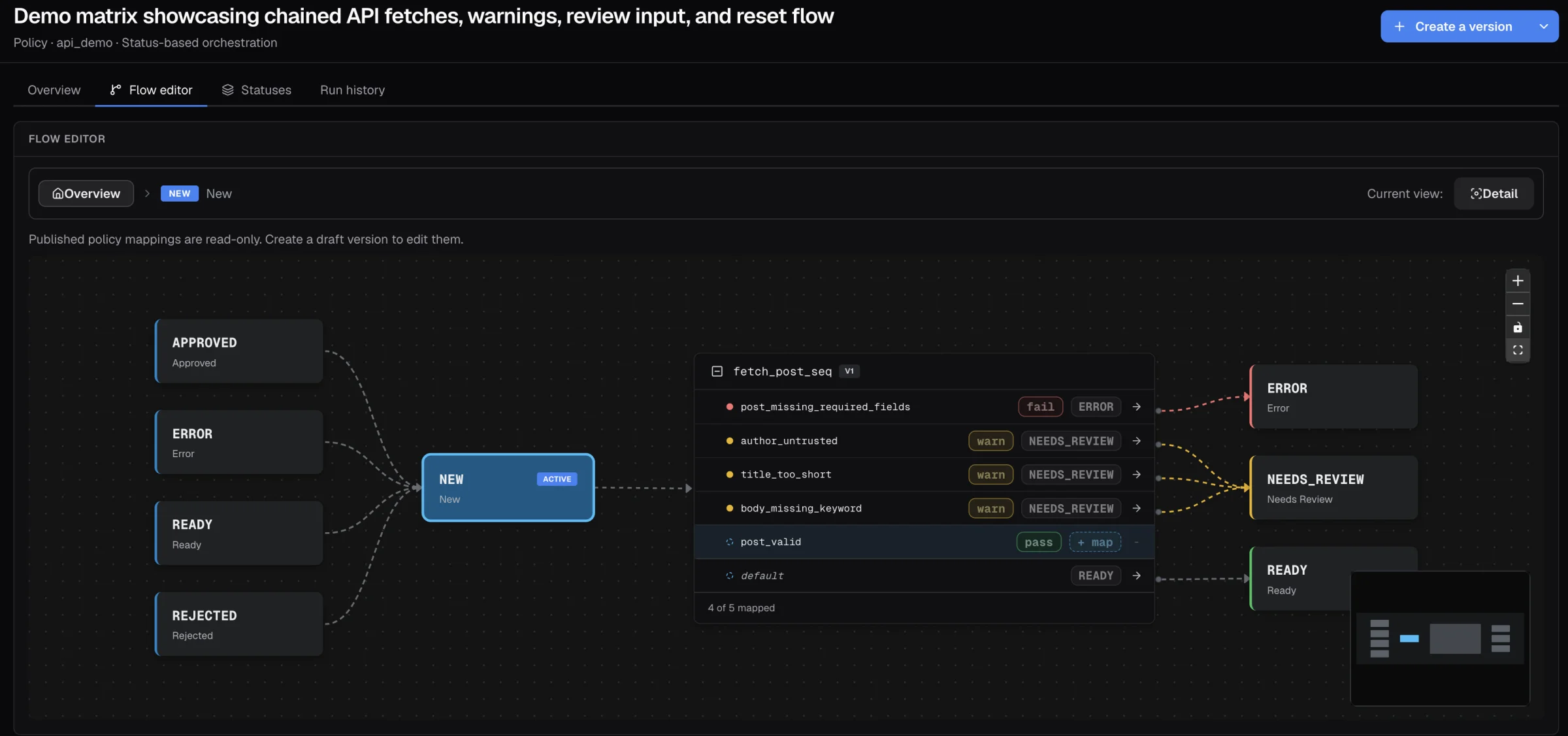
The policy before execution
See which work is available at a status and where each declared outcome leads. Here a demo policy’s New status runs one sequence: each exit condition routes the record to a status, and the default takes the rest. Routing belongs to the policy, separately from the actions that collect or calculate the facts.
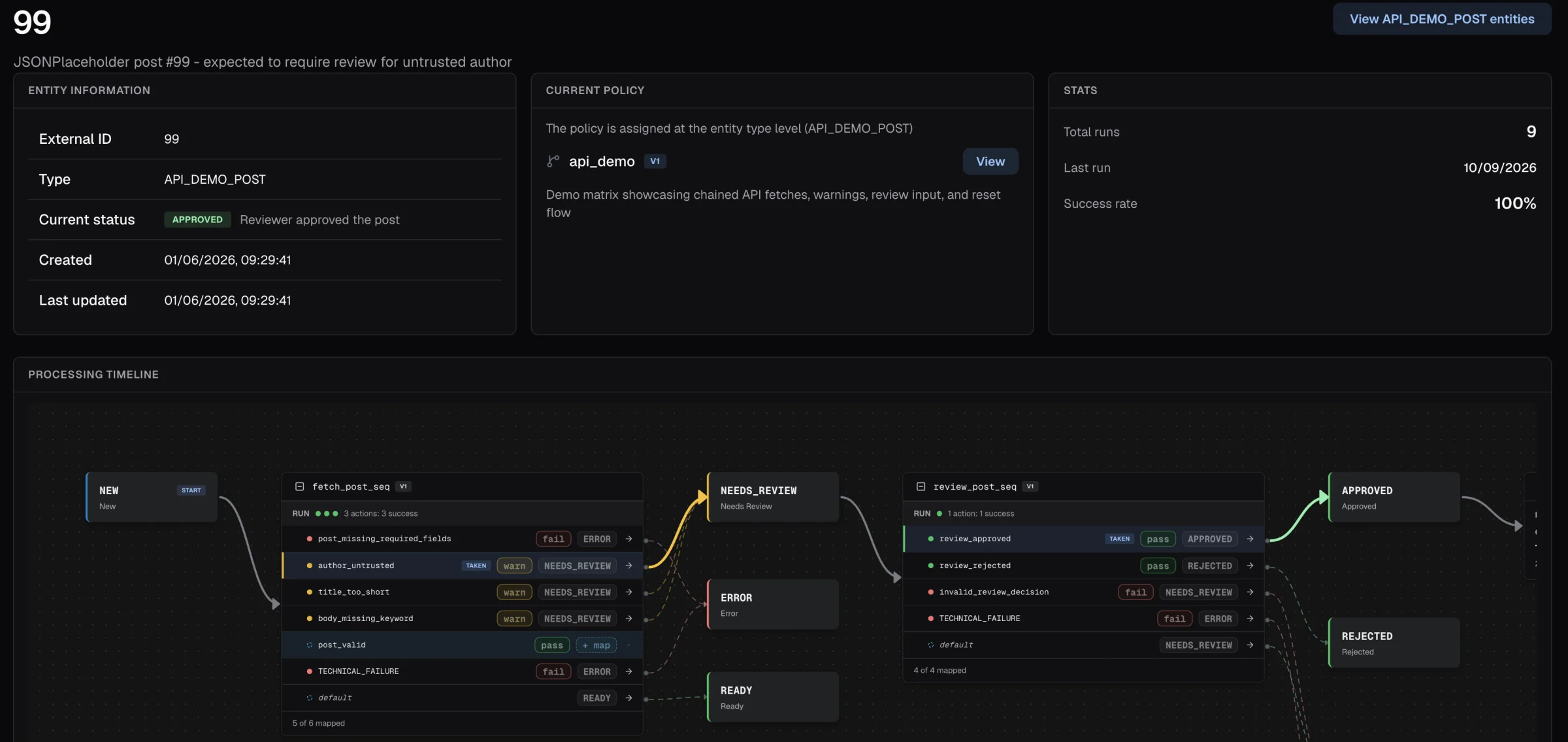
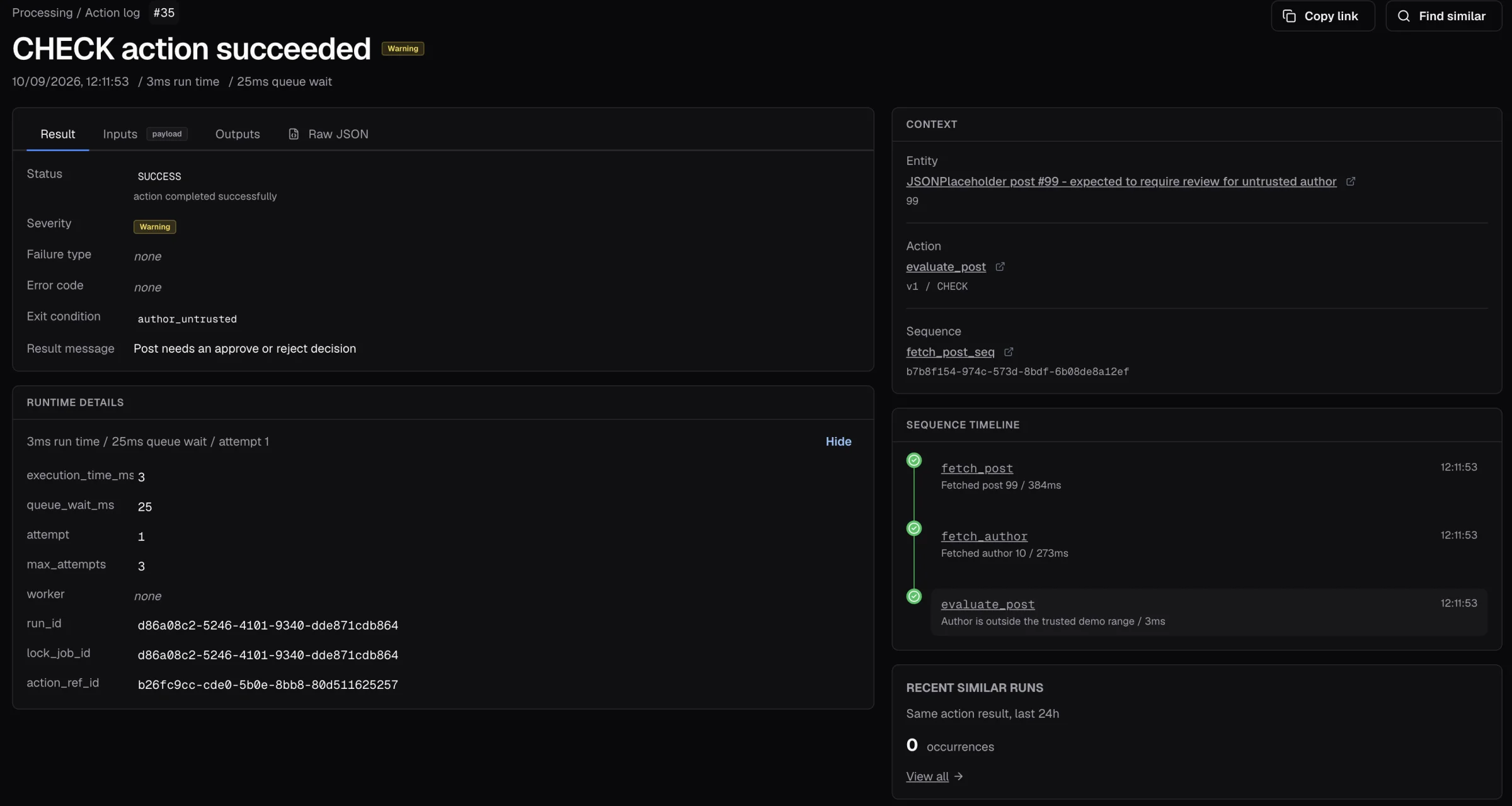
The evidence after execution
Follow a completed run from its action results to its resulting status. This record took author_untrusted to Needs review, then a reviewer’s decision to Approved. Its Action Log entry records the exit condition with the action and sequence versions that produced it.
Your application keeps the business record.
Amon Sul is an engine and a configuration workspace that you integrate with your application. Your application owns the claim, invoice or customer record. Amon Sul keeps a registered reference to it, its policy context, its process status and the evidence of the work it runs.
- Your application
- Owns the business data and user experience. Registers records through the API, reads the work available to them and requests a sequence with its required inputs.
- Amon Sul
- Checks whether the requested work is allowed, executes the configured sequence and applies policy routing. The workspace lets your team configure definitions and inspect execution history.
- Your connected systems
- Supply data or receive operations through configured HTTP and OData connections. Events can notify your application of changes; receivers handle duplicate delivery and confirm their own updates.
A completed run and a confirmed update in another system are separate facts. External operations need the destination’s idempotency or reconciliation support when a response is uncertain.
Read the integration and execution guidesGates, checks and a log.
The useful distinction is where policy lives: explicitly configured alongside the work, with its interpretation recorded in the execution evidence.
Explore the capabilitiesGates
The entity’s policy context determines which sequences are available and how outcomes can change its status. Work that is not permitted in that context is refused.
Checks
Actions call your systems, evaluate rules or calculate values. Their exit conditions describe what they found. Policy decides whether a finding means a warning, a new status or no status change.
A log
Execution evidence connects recorded inputs, outputs, outcomes, actor and definition references. Published definitions are immutable; a later version does not rewrite the definition used by an earlier run.
A different policy can mean a different route.
Staff onboarding records stream through one check sequence. Every few seconds the policy switches between v1 and v2. v2 adds one exit condition, sanctions_match, and from that moment some records route to Held for review.
Each record routes under the version it entered with, and the Action Log stamps that version on every row. This animation is illustrative; it is not live data.
Onboarding records stream through one policy. Under v1 a background flag routes a record to Needs review and everything else falls through to Ready to start. Policy v2 adds a sanctions screen whose match routes the record to On hold. The policy switches between v1 and v2 every few seconds while the Action Log records each route.
policy v1v2adds a sanctions screenno sanctions screen
- background_flagwarnNEEDS_REVIEW
- + exit conditionsanctions_matchfailON_HOLD
- defaultREADY_TO_START
- policy v2E-2232 default→ Ready to start
- policy v2E-2231 sanctions_match→ Held for review
- policy v2E-2230 default→ Ready to start
- policy v2E-2229 default→ Ready to start
- policy v2E-2228 background_flag→ Needs review
- policy v2E-2227 default→ Ready to start
- policy v2E-2226 default→ Ready to start
- policy v2E-2225 sanctions_match→ Held for review
For processes someone will need to explain.
Use Amon Sul where the permitted next step depends on explicit rules, and where a status alone is not enough to explain the result. You supply the business meaning and configure the process; these are examples of where the model fits.
How model outputs fit into policyClaims and warranties
Coverage checks, repair approvals and settlement review.
Invoices and financial controls
Required data, amount thresholds and approval routes.
Employee processes
Hiring checks, role changes and offboarding.
Customer and supplier onboarding
Evidence collection, validation and readiness checks.
Customer records
Consent changes, contract steps and escalations.
AI-assisted decisions
Treat model output as an input to explicit rules and retain what policy did with it.
Bring a process you need to explain.
We’ll walk through its records, checks and permitted outcomes, and show where Amon Sul fits with your existing systems.